From manual chaos to a fully automated membership dashboard
Response Rise, an NZ online coaching programme, needed a single home for members to log in, access courses, and manage billing. We designed every screen in Figma, then built a fully automated, mobile-optimised membership platform on MemberPress, WooCommerce and Stripe, eliminating manual onboarding entirely.
Key Details
Industry: Online coaching / professional development
Client type: Small NZ business
Project type: Custom design & build
Services: WordPress Development
Key results:
- 3 membership tiers live at launch
- Members fully self-serve subscriptions & billing
- Content access automated by membership level
- Dashboard optimised for iPhone and iPad
- Manual onboarding eliminated entirely
A coaching business growing faster than its infrastructure
Response Rise is an online coaching programme with a structured curriculum delivered through tiered memberships. Their content offering was strong and their member base was growing , but the technology holding it all together wasn’t keeping pace.
There was no single place for members to log in, check their plan, access courses, or manage payments. The client was fielding subscription queries manually, helping members locate content, and chasing billing updates by hand. It was taking up time they didn’t have, and it wasn’t sustainable at scale. They found us through a Google search, looking for a WordPress developer who could build a proper solution from the ground up.
A brief that required every moving part to work together
The project had four core requirements: MemberPress to manage membership levels and content restriction, WooCommerce as the transactional layer, Stripe as the payment gateway, and a fully custom dashboard UI built to the Response Rise brand. Nothing about the standard MemberPress interface was going to cut it, the client needed something that looked and felt like a product, not a plugin.
Layered on top of that were the complexity requirements: multiple membership tiers with different content access rules, a self-service subscription management flow including upgrades and cancellations, and full responsiveness on iPhone and iPad. Every screen had to work cleanly at mobile viewport sizes , not just technically, it had to feel native to the device.
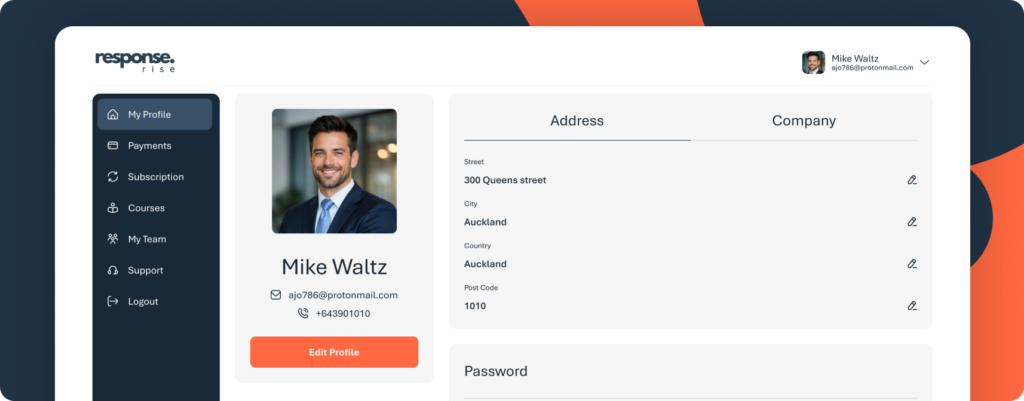
Dashboard navigation menu — the custom dashboard navigation, designed in Figma and built with MemberPress, a far cry from the default plugin interface.
Designing every screen before writing a single line of code
We started in Figma rather than WordPress. Every screen of the member dashboard was designed as a working prototype , the subscriptions view, payment history, profile page, course access, and subscription management flows including the cancellation confirmation step. The client could click through the full experience and approve the design before the build began.
This approach matters on complex projects. It means the client knows exactly what they’re getting, and it means we build to a precise spec rather than making decisions under pressure mid-build. The Figma prototype also served as the reference for every responsive breakpoint designing for iPhone first meant the mobile experience was intentional, not an afterthought.
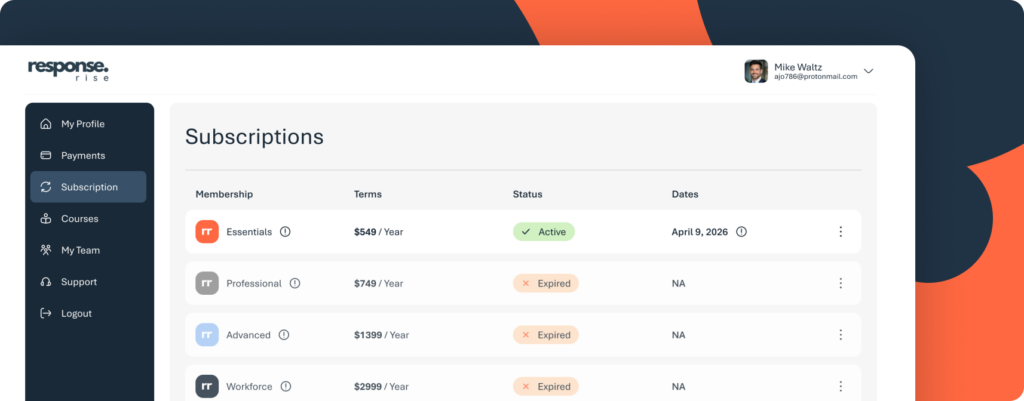
Subscriptions screen — the subscriptions screen as designed in Figma; members see their active plan, renewal date, and all available tiers at a glance.
Building the full membership stack
With the designs approved, we moved into build. MemberPress was configured with four membership levels, Essentials, Professional, Advanced, and Workforce — each with content access rules tied to specific courses and pages. WooCommerce handled the transactional layer, and Stripe was integrated as the recurring billing gateway.
Content restriction is fully automatic. When a member joins or upgrades, their access updates immediately — no manual intervention required. Cancellations are handled through a purpose-built confirmation flow in the dashboard, with a clear prompt before any subscription change takes effect.
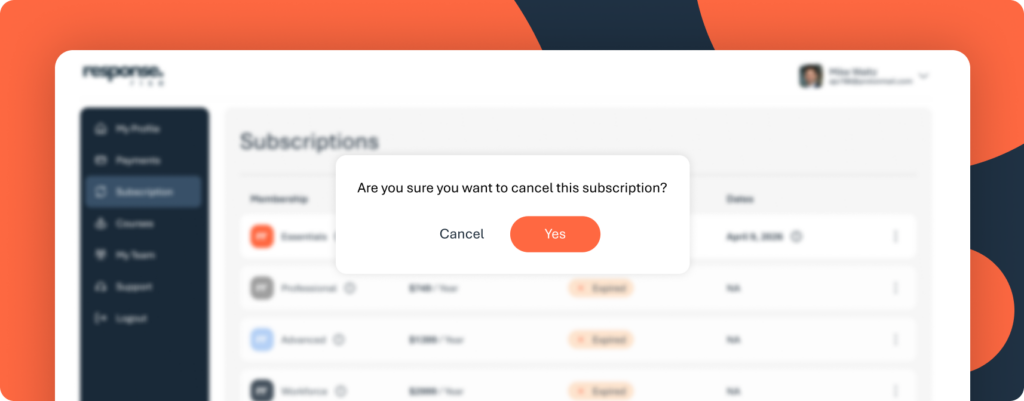
Cancellation confirmation screen — the cancellation confirmation flow, designed to reduce accidental churn while keeping members fully in control.
The entire dashboard was then styled with custom CSS — typography, layout, navigation, tier colour-coding, and responsive behaviour — tested at iPhone and iPad viewports until every screen matched the Figma designs precisely.
Three tiers live, zero manual onboarding from day one
The client launched with three active tiers: Essentials ($549/year), Advanced ($1,399), and Workforce ($2,999). Each carries its own content permissions and a visible upgrade path within the dashboard. Members can view their plan, check their renewal date, review their full payment history, update their profile, and manage their subscription entirely without contacting the client.
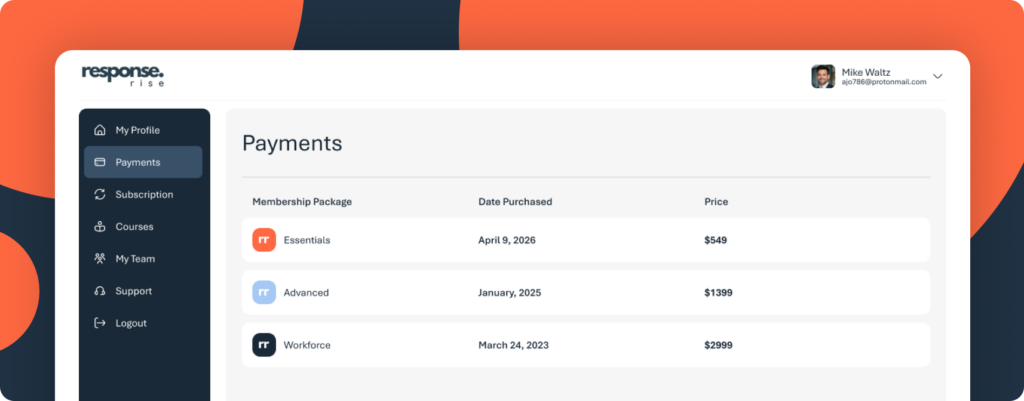
Payments history screen — every transaction visible to members, across all tiers they’ve held.
The manual workload that had been slowing the business down is gone. New members sign up, pay via Stripe, receive automatic access to the right content for their tier, and land in a branded, mobile-optimised dashboard that reflects the quality of the coaching programme itself.
“Members can sign up, access their content, manage their billing, and upgrade their plan — all without us doing anything. That’s what we built it to do.”
Looking ahead
Response Rise now has a membership platform that can scale with the business. Adding a new tier, adjusting content restrictions, or updating pricing requires no developer involvement — the client manages it all from the WordPress admin. The infrastructure is ready for a significantly larger member base without any structural changes needed.
For coaching businesses and online programme creators considering a similar build: the investment in a proper design phase pays for itself. Getting the UX right in Figma before touching WordPress removes ambiguity, reduces rework, and means the finished product actually matches what the client had in mind.
Looking to build a membership site on WordPress? Get in touch →
